
# Roles and Permissions

{% hint style="info" %}
This feature is available on Beefree SDK [paid plans](https://developers.beefree.io/pricing-plans) only.
{% endhint %}

## About roles and permissions <a href="#about-roles-and-permissions" id="about-roles-and-permissions"></a>

In Beefree SDK we introduced the idea that some content may be editable by some users and not others. For example, you may want the header and footer section of an email newsletter to be locked, so that it cannot be inadvertently modified when creating the latest version of your weekly news digest.

Internally, we’ve been calling this feature “Restricted editing”. Others refer to it as “locked regions”, “blocked content”, and more.

To allow for this, we created ways for the application hosting the builder to define user roles and set their permissions. Let’s take a look at how the feature works first and then show you how to configure your application to take advantage of it.

## Types of roles <a href="#types-of-roles" id="types-of-roles"></a>

The user roles that you create (e.g. *Brand Manager*, *Senior Editor*, *Junior Editor*, etc.) can have different permissions. You can create as many or few user roles as you wish. The permissions that you can assign to them refer to:

* Locking content (entire rows or specific content blocks)
* Editing locked content
* Using [Display Conditions](https://docs.beefree.io/beefree-sdk/~/changes/480/other-customizations/advanced-options/display-conditions)

Specifically, the permission settings that can be configured for each role are:

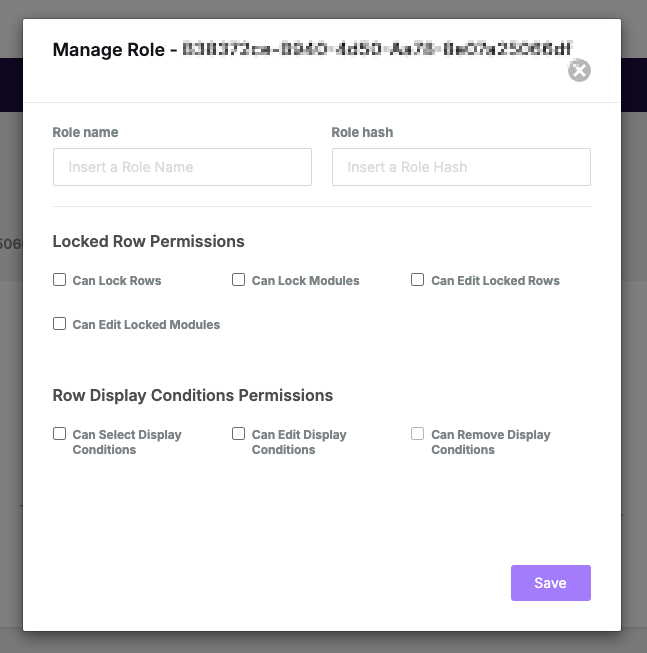
* Can lock rows (if active, all other permissions are granted)
* Can lock modules
* Can edit locked rows
* Can edit locked modules
* Can select Display Conditions
* Can edit Display Conditions
* Can remove Display Conditions

For example, a *Brand Manager* all four permissions checked, whereas a *Senior Editor* might have editing access to rows and modules, but won’t be able to lock rows and modules. Let’s take a look at a few scenarios.

## Locking a row <a href="#locking-a-row" id="locking-a-row"></a>

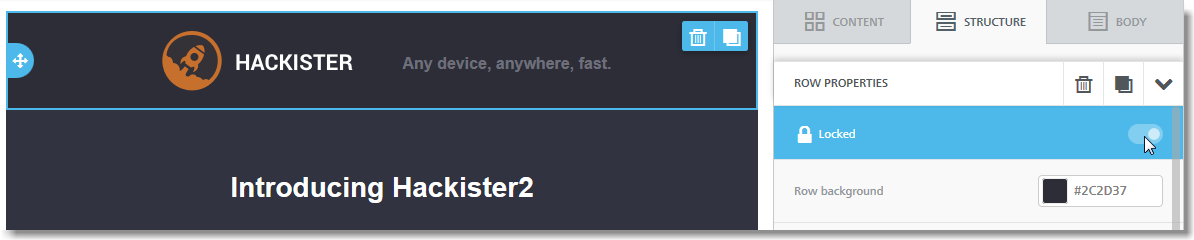
If the user has this permission, locking a row is very easy to do. That user will simply select the row they would like to lock and click on the lock/unlock radio button in the row properties panel.

<figure><img src="https://806400411-files.gitbook.io/~/files/v0/b/gitbook-x-prod.appspot.com/o/spaces%2F8c7XIQHfAtM23Dp3ozIC%2Fuploads%2FtHD3igsMSyMychMgEiW3%2Flock-row.png?alt=media&#x26;token=7020c3b9-8c4f-4929-8c92-bd0096418d21" alt=""><figcaption></figcaption></figure>

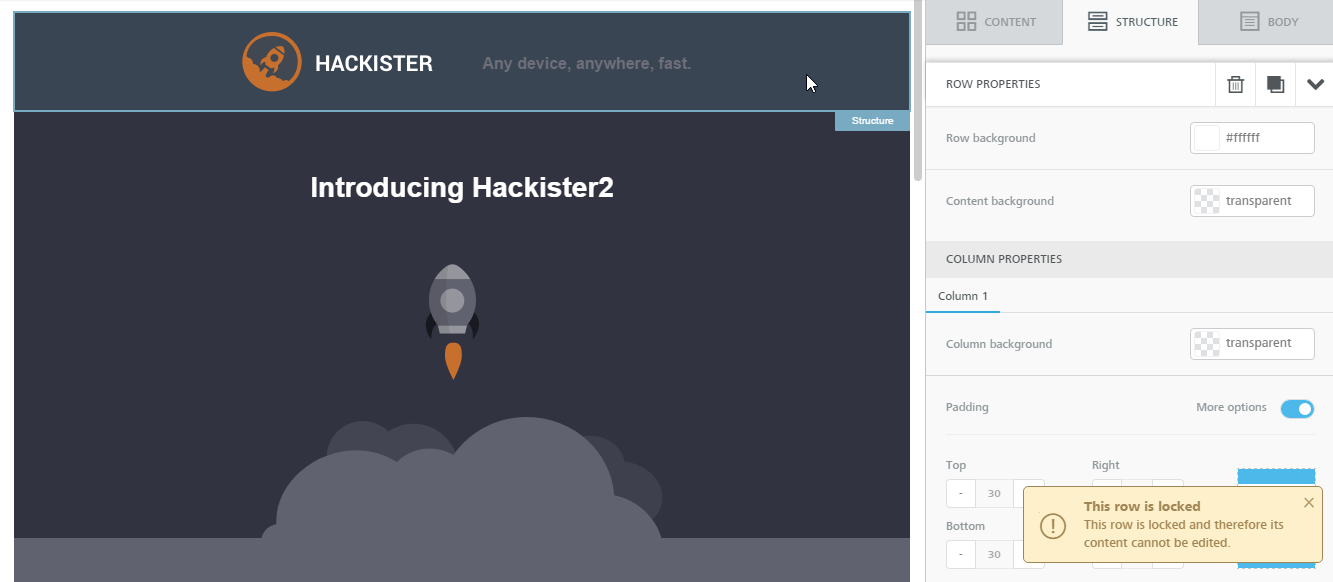
If a user does not have the permissions needed to edit a locked row, they will see a friendly error when they attempt to select the row, notifying them that the row can’t be edited:

<figure><img src="https://806400411-files.gitbook.io/~/files/v0/b/gitbook-x-prod.appspot.com/o/spaces%2F8c7XIQHfAtM23Dp3ozIC%2Fuploads%2FTnz6m0iRppvPfxnC70Mj%2F2locked-row-.png?alt=media&#x26;token=0fd02e6e-ac60-4ead-947c-8bc82038c532" alt=""><figcaption></figcaption></figure>

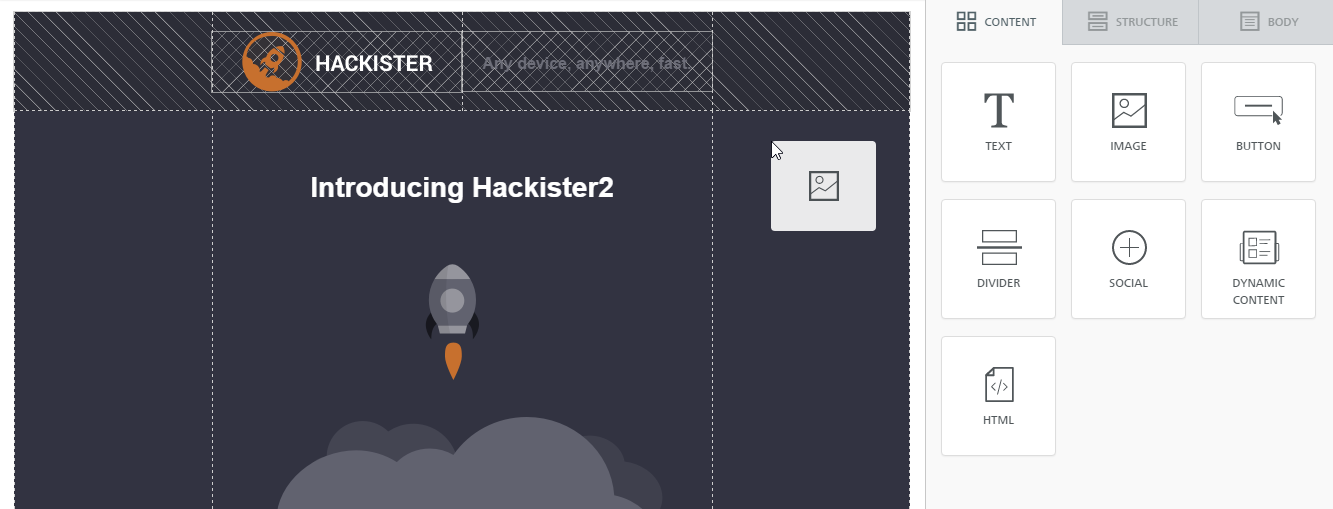
Likewise, they will not be able to drag & drop any content blocks on the locked row, as shown here:

<figure><img src="https://806400411-files.gitbook.io/~/files/v0/b/gitbook-x-prod.appspot.com/o/spaces%2F8c7XIQHfAtM23Dp3ozIC%2Fuploads%2FTmRJFi8x3eHoP7EUE3Qr%2F3locked-drag-n-drop.png?alt=media&#x26;token=a39153e6-cf75-4d06-b9ab-17ece043e548" alt=""><figcaption></figcaption></figure>

## Rows vs content blocks <a href="#rows-vs-content-blocks" id="rows-vs-content-blocks"></a>

You can restrict access to layout changes while granting access to content modifications by using user roles and permissions.

This allows you to give your users editing access to the content, while ensuring that the overall layout of the message is not altered, and that specific content blocks that should not be modified are left “as is”. This way, for example, a junior member of the marketing team could focus on updating text & images, without worrying about potentially modifying the structure of the message in an unwanted and/or unauthorized way.

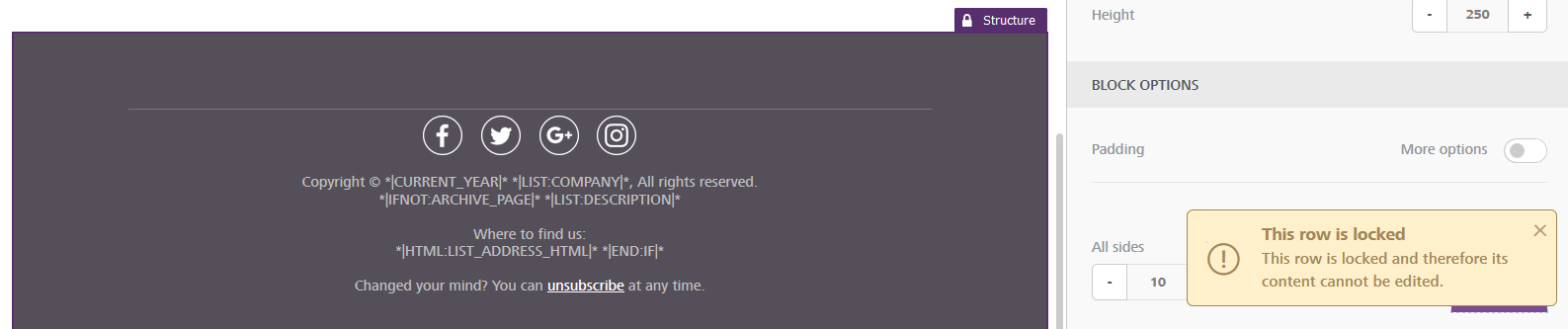
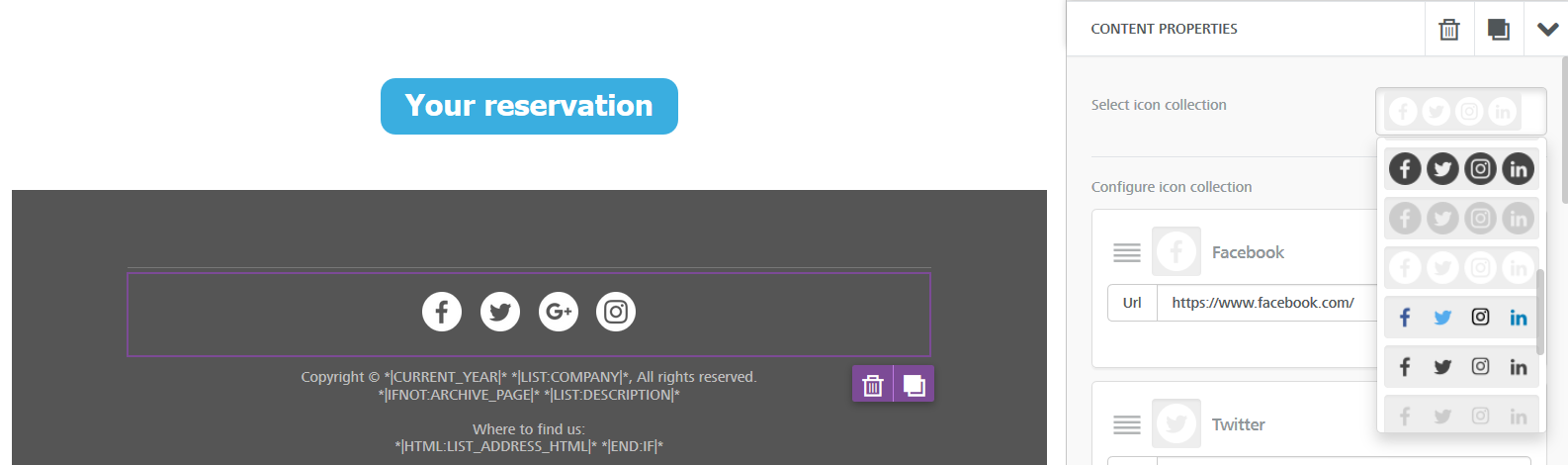
Or, as shown in the example below, the same user could update social media icons and links in the footer of an email, without altering legal language and dynamic fields used in the same footer. That’s accomplished by setting us a social media module that’s editable (unlocked), but in a row that’s locked.

When users without the proper permissions try to edit, move or remove the row, they are told that they may not do so.

<figure><img src="https://806400411-files.gitbook.io/~/files/v0/b/gitbook-x-prod.appspot.com/o/spaces%2F8c7XIQHfAtM23Dp3ozIC%2Fuploads%2Flq8XBfPr7eHex6kc7pKr%2F4bee_plugin_user_roles_row_locked.png?alt=media&#x26;token=6a40d6e5-9be8-4709-8fdc-52bf39525900" alt=""><figcaption></figcaption></figure>

Similarly, if they try to edit any content is the row that has not been specifically unlocked, they are told that they are not able to do so. In this case, for instance, the user is not able to edit the merge tags used in the footer of the email.

<figure><img src="https://806400411-files.gitbook.io/~/files/v0/b/gitbook-x-prod.appspot.com/o/spaces%2F8c7XIQHfAtM23Dp3ozIC%2Fuploads%2FMiMRsIsgtFraNArarmMG%2F5bee_plugin_user_roles_row_content_locked.png?alt=media&#x26;token=9c07c2ee-9dd3-4e7c-99b9-f57235aab705" alt=""><figcaption></figcaption></figure>

However, when they click on the social media icons, they are able to edit it.

<figure><img src="https://806400411-files.gitbook.io/~/files/v0/b/gitbook-x-prod.appspot.com/o/spaces%2F8c7XIQHfAtM23Dp3ozIC%2Fuploads%2FCjGc46uOVQGDQFM1cUrf%2F6bee_plugin_user_roles_row_content_not_locked.png?alt=media&#x26;token=260233bd-be3e-4706-8e20-dec29aaa93b3" alt=""><figcaption></figcaption></figure>

To accomplish the above, a user with higher permissions needs to:

1. Open the message in the builder
2. Lock a row
3. Unlock one or more specific pieces of content within the row.

## Creating and editing user roles <a href="#creating-and-editing-user-roles" id="creating-and-editing-user-roles"></a>

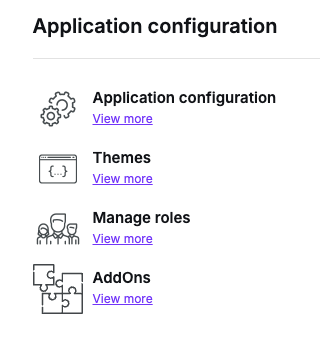
Log into the [Beefree SDK Console](https://developers.beefree.io/) and click on **Manage roles** under Application configuration for the selected application:

<figure><img src="https://806400411-files.gitbook.io/~/files/v0/b/gitbook-x-prod.appspot.com/o/spaces%2F8c7XIQHfAtM23Dp3ozIC%2Fuploads%2FbB3iAt5rau29TT4rVrX9%2FCleanShot%202025-03-13%20at%2014.40.52.png?alt=media&#x26;token=86b569d5-a9d1-4259-94cc-abd8c874b941" alt=""><figcaption></figcaption></figure>

In the Manage Roles section you’ll be able to create different user roles and set their permissions. For example, your user roles could be Brand Manager, Account Manager, Junior Editor, etc depending on your needs and nomenclature. For each user role you create, you can set and restrict editing permissions, such as the ability to lock or edit rows and content blocks, as you can see below:

<figure><img src="https://806400411-files.gitbook.io/~/files/v0/b/gitbook-x-prod.appspot.com/o/spaces%2F8c7XIQHfAtM23Dp3ozIC%2Fuploads%2FqPg7ML4Ld4qIgRaoDO6b%2FCleanShot%202025-03-13%20at%2014.41.17.png?alt=media&#x26;token=fb666174-b648-4a25-9d78-f1442651693d" alt=""><figcaption></figcaption></figure>

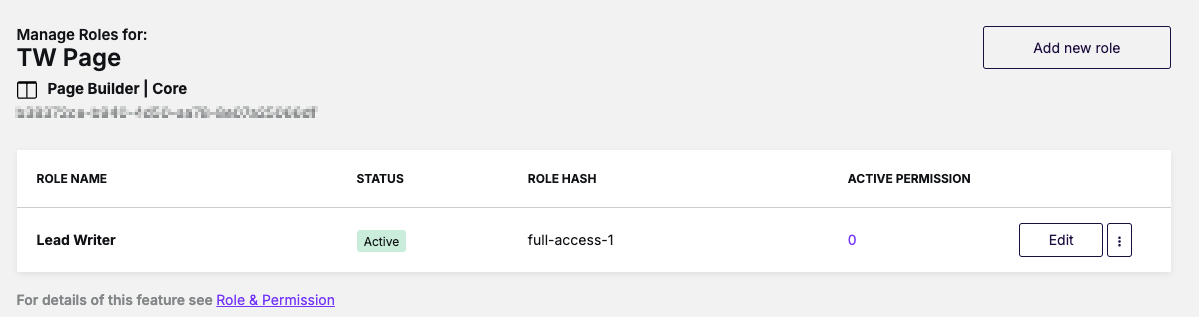
Once you create your user roles you’ll be able to see them listed:

<figure><img src="https://806400411-files.gitbook.io/~/files/v0/b/gitbook-x-prod.appspot.com/o/spaces%2F8c7XIQHfAtM23Dp3ozIC%2Fuploads%2FUdse6wrM5VWABPWHqlu2%2FCleanShot%202025-03-13%20at%2014.42.02.png?alt=media&#x26;token=fb469a09-d7b8-4de0-9ae7-d3e9cea101d0" alt=""><figcaption></figcaption></figure>

## How to use the Role Hash parameter <a href="#how-to-use-the-role-hash-parameter" id="how-to-use-the-role-hash-parameter"></a>

While **Role Name** is a friendly description of that user role, **Role Hash** is the parameter that identifies that particular role in Beefree SDK. It must be an alphanumeric string between 8 to 30 characters: it can contain letters and numbers, but cannot contain spaces or special characters (such as “-“, “\_”, etc.). You will need to save these role hashes in your application, at the user level – or at the user role level, if you have the concept of “roles” in your application – so that you can retrieve them and pass them to the application when you initialize the builder for that specific user.

The property name is: `roleHash`.

For user roles to become active in the builder , you will need to add this new property to your Beefree SDK configuration when you configure the builder for a specific user. You will pass:

`roleHash: "roleSpecified"`

for each of the user, depending on its role. For example, if the Role Hash for a “Junior Editor” is “juniorEditor”, the application configuration will include:

`roleHash: "juniorEditor"`

Please refer to [configuring the builder](https://docs.beefree.io/beefree-sdk/~/changes/480/getting-started/readme/installation/configuration-parameters) for more details.

## Combination of user roles and permissions <a href="#combination-of-user-roles-and-permissions" id="combination-of-user-roles-and-permissions"></a>

This section goes in more details about the various combinations of permissions. It might help you understand how to best put this feature to work in Beefree SDK with regard to locking & unlocking rows and content blocks.

First, we created some **hypothetical roles** by using all application combinations of the available user permissions at the row/content level.

| Role          | Lock rows            | Edit locked rows     | Lock modules         | Edit locked modules  |
| ------------- | -------------------- | -------------------- | -------------------- | -------------------- |
| **admin**     | :white\_check\_mark: | :white\_check\_mark: | :white\_check\_mark: | :white\_check\_mark: |
| **designer**  | :x:                  | :white\_check\_mark: | :x:                  | :white\_check\_mark: |
| **designer2** | :x:                  | :white\_check\_mark: | :white\_check\_mark: | :white\_check\_mark: |
| **copy**      | :x:                  | :x:                  | :white\_check\_mark: | :white\_check\_mark: |
| **modules**   | :x:                  | :x:                  | :x:                  | :white\_check\_mark: |
| **rows**      | :x:                  | :white\_check\_mark: | :x:                  | :x:                  |
| **user**      | :x:                  | :x:                  | :x:                  | :x:                  |

Then, we created a table with a number of possible “actions” and see which user role would have access to which actions. This allows you to map a certain combination of permissions (from above) to a specific task carried out in the Beefree SDK builder.

<table data-full-width="true"><thead><tr><th width="188">Description</th><th>admin</th><th>designer</th><th width="100">designer2</th><th>copy</th><th>modules</th><th>rows</th><th>user</th></tr></thead><tbody><tr><td>Lock/unlock a module</td><td><span data-gb-custom-inline data-tag="emoji" data-code="2705">✅</span></td><td><p><span data-gb-custom-inline data-tag="emoji" data-code="274c">❌</span></p><p>widget not provided</p></td><td><span data-gb-custom-inline data-tag="emoji" data-code="2705">✅</span></td><td><span data-gb-custom-inline data-tag="emoji" data-code="2705">✅</span></td><td><p><span data-gb-custom-inline data-tag="emoji" data-code="274c">❌</span></p><p>widget not provided</p></td><td><p><span data-gb-custom-inline data-tag="emoji" data-code="274c">❌</span></p><p>widget not provided</p></td><td><p><span data-gb-custom-inline data-tag="emoji" data-code="274c">❌</span></p><p>widget not provided</p></td></tr><tr><td>Lock/unlock a row</td><td><span data-gb-custom-inline data-tag="emoji" data-code="2705">✅</span></td><td><p><span data-gb-custom-inline data-tag="emoji" data-code="274c">❌</span></p><p>widget not provided</p></td><td><p><span data-gb-custom-inline data-tag="emoji" data-code="274c">❌</span></p><p>widget not provided</p></td><td><p><span data-gb-custom-inline data-tag="emoji" data-code="274c">❌</span></p><p>widget not provided</p></td><td><p><span data-gb-custom-inline data-tag="emoji" data-code="274c">❌</span></p><p>widget not provided</p></td><td><p><span data-gb-custom-inline data-tag="emoji" data-code="274c">❌</span></p><p>widget not provided</p></td><td><p><span data-gb-custom-inline data-tag="emoji" data-code="274c">❌</span></p><p>widget not provided</p></td></tr><tr><td>Add a module to locked row (the module is automatically locked)</td><td><span data-gb-custom-inline data-tag="emoji" data-code="2705">✅</span></td><td><span data-gb-custom-inline data-tag="emoji" data-code="2705">✅</span></td><td><span data-gb-custom-inline data-tag="emoji" data-code="2705">✅</span></td><td><p><span data-gb-custom-inline data-tag="emoji" data-code="274c">❌</span></p><p>can’t drop modules in locked rows</p></td><td><p><span data-gb-custom-inline data-tag="emoji" data-code="274c">❌</span></p><p>can’t drop modules in locked rows</p></td><td><span data-gb-custom-inline data-tag="emoji" data-code="2705">✅</span></td><td><p><span data-gb-custom-inline data-tag="emoji" data-code="274c">❌</span></p><p>can’t drop modules in locked rows</p></td></tr><tr><td>Move a locked module from an unlocked row to a locked one</td><td><span data-gb-custom-inline data-tag="emoji" data-code="2705">✅</span></td><td><span data-gb-custom-inline data-tag="emoji" data-code="2705">✅</span></td><td><span data-gb-custom-inline data-tag="emoji" data-code="2705">✅</span></td><td><p><span data-gb-custom-inline data-tag="emoji" data-code="274c">❌</span></p><p>can’t drop modules in locked rows</p></td><td><p><span data-gb-custom-inline data-tag="emoji" data-code="274c">❌</span></p><p>can’t drop modules in locked rows</p></td><td><span data-gb-custom-inline data-tag="emoji" data-code="2705">✅</span></td><td><p><span data-gb-custom-inline data-tag="emoji" data-code="274c">❌</span></p><p>module handler not provided</p></td></tr><tr><td>Move a locked module from a locked row to a locked one</td><td><span data-gb-custom-inline data-tag="emoji" data-code="2705">✅</span></td><td><span data-gb-custom-inline data-tag="emoji" data-code="2705">✅</span></td><td><span data-gb-custom-inline data-tag="emoji" data-code="2705">✅</span></td><td><p><span data-gb-custom-inline data-tag="emoji" data-code="274c">❌</span></p><p>module handler not provided</p></td><td><p><span data-gb-custom-inline data-tag="emoji" data-code="274c">❌</span></p><p>module handler not provided</p></td><td><span data-gb-custom-inline data-tag="emoji" data-code="2705">✅</span></td><td><p><span data-gb-custom-inline data-tag="emoji" data-code="274c">❌</span></p><p>module handler not provided</p></td></tr><tr><td>Move a locked module from a locked row to an unlocked one</td><td><span data-gb-custom-inline data-tag="emoji" data-code="2705">✅</span></td><td><span data-gb-custom-inline data-tag="emoji" data-code="2705">✅</span></td><td><span data-gb-custom-inline data-tag="emoji" data-code="2705">✅</span></td><td><p><span data-gb-custom-inline data-tag="emoji" data-code="274c">❌</span></p><p>module handler not provided</p></td><td><p><span data-gb-custom-inline data-tag="emoji" data-code="274c">❌</span></p><p>module handler not provided</p></td><td><span data-gb-custom-inline data-tag="emoji" data-code="2705">✅</span></td><td><p><span data-gb-custom-inline data-tag="emoji" data-code="274c">❌</span></p><p>module handler not provided</p></td></tr><tr><td>Move a locked module from an unlocked row to an unlocked one</td><td><span data-gb-custom-inline data-tag="emoji" data-code="2705">✅</span></td><td><span data-gb-custom-inline data-tag="emoji" data-code="2705">✅</span></td><td><span data-gb-custom-inline data-tag="emoji" data-code="2705">✅</span></td><td><span data-gb-custom-inline data-tag="emoji" data-code="2705">✅</span></td><td><span data-gb-custom-inline data-tag="emoji" data-code="2705">✅</span></td><td><span data-gb-custom-inline data-tag="emoji" data-code="2705">✅</span></td><td><p><span data-gb-custom-inline data-tag="emoji" data-code="274c">❌</span></p><p>module handler not provided</p></td></tr><tr><td>Move an unlocked module from an unlocked row to a locked one</td><td><span data-gb-custom-inline data-tag="emoji" data-code="2705">✅</span></td><td><span data-gb-custom-inline data-tag="emoji" data-code="2705">✅</span></td><td><span data-gb-custom-inline data-tag="emoji" data-code="2705">✅</span></td><td><p><span data-gb-custom-inline data-tag="emoji" data-code="274c">❌</span></p><p>can’t drop modules in locked rows</p></td><td><p><span data-gb-custom-inline data-tag="emoji" data-code="274c">❌</span></p><p>can’t drop modules in locked rows</p></td><td><span data-gb-custom-inline data-tag="emoji" data-code="2705">✅</span></td><td><p><span data-gb-custom-inline data-tag="emoji" data-code="274c">❌</span></p><p>can’t drop modules in locked rows</p></td></tr><tr><td>Move an unlocked module from a locked row to a locked one</td><td><span data-gb-custom-inline data-tag="emoji" data-code="2705">✅</span></td><td><span data-gb-custom-inline data-tag="emoji" data-code="2705">✅</span></td><td><span data-gb-custom-inline data-tag="emoji" data-code="2705">✅</span></td><td><p><span data-gb-custom-inline data-tag="emoji" data-code="274c">❌</span></p><p>module handler not provided</p></td><td><p><span data-gb-custom-inline data-tag="emoji" data-code="274c">❌</span></p><p>module handler not provided</p></td><td><span data-gb-custom-inline data-tag="emoji" data-code="2705">✅</span></td><td><p><span data-gb-custom-inline data-tag="emoji" data-code="274c">❌</span></p><p>module handler not provided</p></td></tr><tr><td>Move an unlocked module from a locked row to an unlocked one</td><td><span data-gb-custom-inline data-tag="emoji" data-code="2705">✅</span></td><td><span data-gb-custom-inline data-tag="emoji" data-code="2705">✅</span></td><td><span data-gb-custom-inline data-tag="emoji" data-code="2705">✅</span></td><td><p><span data-gb-custom-inline data-tag="emoji" data-code="274c">❌</span></p><p>module handler not provided</p></td><td><p><span data-gb-custom-inline data-tag="emoji" data-code="274c">❌</span></p><p>module handler not provided</p></td><td><span data-gb-custom-inline data-tag="emoji" data-code="2705">✅</span></td><td><p><span data-gb-custom-inline data-tag="emoji" data-code="274c">❌</span></p><p>module handler not provided</p></td></tr><tr><td>Move an unlocked module from an unlocked row to an unlocked one</td><td><span data-gb-custom-inline data-tag="emoji" data-code="2705">✅</span></td><td><span data-gb-custom-inline data-tag="emoji" data-code="2705">✅</span></td><td><span data-gb-custom-inline data-tag="emoji" data-code="2705">✅</span></td><td><span data-gb-custom-inline data-tag="emoji" data-code="2705">✅</span></td><td><span data-gb-custom-inline data-tag="emoji" data-code="2705">✅</span></td><td><span data-gb-custom-inline data-tag="emoji" data-code="2705">✅</span></td><td><span data-gb-custom-inline data-tag="emoji" data-code="2705">✅</span></td></tr><tr><td>Move a locked row</td><td><span data-gb-custom-inline data-tag="emoji" data-code="2705">✅</span></td><td><span data-gb-custom-inline data-tag="emoji" data-code="2705">✅</span></td><td><span data-gb-custom-inline data-tag="emoji" data-code="2705">✅</span></td><td><p><span data-gb-custom-inline data-tag="emoji" data-code="274c">❌</span></p><p>row handler not provided</p></td><td><p><span data-gb-custom-inline data-tag="emoji" data-code="274c">❌</span></p><p>row handler not provided</p></td><td><span data-gb-custom-inline data-tag="emoji" data-code="2705">✅</span></td><td><p><span data-gb-custom-inline data-tag="emoji" data-code="274c">❌</span></p><p>row handler not provided</p></td></tr><tr><td>Move an unlocked row</td><td><span data-gb-custom-inline data-tag="emoji" data-code="2705">✅</span></td><td><span data-gb-custom-inline data-tag="emoji" data-code="2705">✅</span></td><td><span data-gb-custom-inline data-tag="emoji" data-code="2705">✅</span></td><td><span data-gb-custom-inline data-tag="emoji" data-code="2705">✅</span></td><td><span data-gb-custom-inline data-tag="emoji" data-code="2705">✅</span></td><td><span data-gb-custom-inline data-tag="emoji" data-code="2705">✅</span></td><td><span data-gb-custom-inline data-tag="emoji" data-code="2705">✅</span></td></tr><tr><td>Delete/duplicate a locked module in locked row</td><td><span data-gb-custom-inline data-tag="emoji" data-code="2705">✅</span></td><td><span data-gb-custom-inline data-tag="emoji" data-code="2705">✅</span></td><td><span data-gb-custom-inline data-tag="emoji" data-code="2705">✅</span></td><td><p><span data-gb-custom-inline data-tag="emoji" data-code="274c">❌</span></p><p>show warning</p></td><td><p><span data-gb-custom-inline data-tag="emoji" data-code="274c">❌</span></p><p>show warning</p></td><td><span data-gb-custom-inline data-tag="emoji" data-code="2705">✅</span></td><td><p><span data-gb-custom-inline data-tag="emoji" data-code="274c">❌</span></p><p>show warning</p></td></tr><tr><td>Delete/duplicate an unlocked module in locked row</td><td><span data-gb-custom-inline data-tag="emoji" data-code="2705">✅</span></td><td><span data-gb-custom-inline data-tag="emoji" data-code="2705">✅</span></td><td><span data-gb-custom-inline data-tag="emoji" data-code="2705">✅</span></td><td><p><span data-gb-custom-inline data-tag="emoji" data-code="274c">❌</span></p><p>show warning</p></td><td><p><span data-gb-custom-inline data-tag="emoji" data-code="274c">❌</span></p><p>show warning</p></td><td><span data-gb-custom-inline data-tag="emoji" data-code="2705">✅</span></td><td><p><span data-gb-custom-inline data-tag="emoji" data-code="274c">❌</span></p><p>show warning</p></td></tr><tr><td>Delete/duplicate a locked module in unlocked row</td><td><span data-gb-custom-inline data-tag="emoji" data-code="2705">✅</span></td><td><span data-gb-custom-inline data-tag="emoji" data-code="2705">✅</span></td><td><span data-gb-custom-inline data-tag="emoji" data-code="2705">✅</span></td><td><span data-gb-custom-inline data-tag="emoji" data-code="2705">✅</span></td><td><span data-gb-custom-inline data-tag="emoji" data-code="2705">✅</span></td><td><span data-gb-custom-inline data-tag="emoji" data-code="2705">✅</span></td><td><p><span data-gb-custom-inline data-tag="emoji" data-code="274c">❌</span></p><p>show warning</p></td></tr><tr><td>Delete/duplicate an unlocked module in unlocked row</td><td><span data-gb-custom-inline data-tag="emoji" data-code="2705">✅</span></td><td><span data-gb-custom-inline data-tag="emoji" data-code="2705">✅</span></td><td><span data-gb-custom-inline data-tag="emoji" data-code="2705">✅</span></td><td><span data-gb-custom-inline data-tag="emoji" data-code="2705">✅</span></td><td><span data-gb-custom-inline data-tag="emoji" data-code="2705">✅</span></td><td><span data-gb-custom-inline data-tag="emoji" data-code="2705">✅</span></td><td><span data-gb-custom-inline data-tag="emoji" data-code="2705">✅</span></td></tr><tr><td>Delete/duplicate unlocked row containing locked modules</td><td><span data-gb-custom-inline data-tag="emoji" data-code="2705">✅</span></td><td><span data-gb-custom-inline data-tag="emoji" data-code="2705">✅</span></td><td><span data-gb-custom-inline data-tag="emoji" data-code="2705">✅</span></td><td><span data-gb-custom-inline data-tag="emoji" data-code="2705">✅</span></td><td><span data-gb-custom-inline data-tag="emoji" data-code="2705">✅</span></td><td><p><span data-gb-custom-inline data-tag="emoji" data-code="274c">❌</span></p><p>show error</p></td><td><p><span data-gb-custom-inline data-tag="emoji" data-code="274c">❌</span></p><p>show error</p></td></tr><tr><td>Delete/duplicate locked row</td><td><span data-gb-custom-inline data-tag="emoji" data-code="2705">✅</span></td><td><span data-gb-custom-inline data-tag="emoji" data-code="2705">✅</span></td><td><span data-gb-custom-inline data-tag="emoji" data-code="2705">✅</span></td><td><p><span data-gb-custom-inline data-tag="emoji" data-code="274c">❌</span></p><p>show warning</p></td><td><p><span data-gb-custom-inline data-tag="emoji" data-code="274c">❌</span></p><p>show warning</p></td><td><span data-gb-custom-inline data-tag="emoji" data-code="2705">✅</span></td><td><p><span data-gb-custom-inline data-tag="emoji" data-code="274c">❌</span></p><p>show warning</p></td></tr><tr><td>Change properties of a locked module</td><td><span data-gb-custom-inline data-tag="emoji" data-code="2705">✅</span></td><td><span data-gb-custom-inline data-tag="emoji" data-code="2705">✅</span></td><td><span data-gb-custom-inline data-tag="emoji" data-code="2705">✅</span></td><td><span data-gb-custom-inline data-tag="emoji" data-code="2705">✅</span></td><td><span data-gb-custom-inline data-tag="emoji" data-code="2705">✅</span></td><td><p><span data-gb-custom-inline data-tag="emoji" data-code="274c">❌</span></p><p>show warning</p></td><td><p><span data-gb-custom-inline data-tag="emoji" data-code="274c">❌</span></p><p>show warning</p></td></tr><tr><td>Change properties of an unlocked module</td><td><span data-gb-custom-inline data-tag="emoji" data-code="2705">✅</span></td><td><span data-gb-custom-inline data-tag="emoji" data-code="2705">✅</span></td><td><span data-gb-custom-inline data-tag="emoji" data-code="2705">✅</span></td><td><span data-gb-custom-inline data-tag="emoji" data-code="2705">✅</span></td><td><span data-gb-custom-inline data-tag="emoji" data-code="2705">✅</span></td><td><span data-gb-custom-inline data-tag="emoji" data-code="2705">✅</span></td><td><span data-gb-custom-inline data-tag="emoji" data-code="2705">✅</span></td></tr><tr><td>Change text of a text/button locked module</td><td><span data-gb-custom-inline data-tag="emoji" data-code="2705">✅</span></td><td><span data-gb-custom-inline data-tag="emoji" data-code="2705">✅</span></td><td><span data-gb-custom-inline data-tag="emoji" data-code="2705">✅</span></td><td><span data-gb-custom-inline data-tag="emoji" data-code="2705">✅</span></td><td><span data-gb-custom-inline data-tag="emoji" data-code="2705">✅</span></td><td><p><span data-gb-custom-inline data-tag="emoji" data-code="274c">❌</span></p><p>show warning</p></td><td><p><span data-gb-custom-inline data-tag="emoji" data-code="274c">❌</span></p><p>show warning</p></td></tr><tr><td>Change text of a text/button unlocked module</td><td><span data-gb-custom-inline data-tag="emoji" data-code="2705">✅</span></td><td><span data-gb-custom-inline data-tag="emoji" data-code="2705">✅</span></td><td><span data-gb-custom-inline data-tag="emoji" data-code="2705">✅</span></td><td><span data-gb-custom-inline data-tag="emoji" data-code="2705">✅</span></td><td><span data-gb-custom-inline data-tag="emoji" data-code="2705">✅</span></td><td><span data-gb-custom-inline data-tag="emoji" data-code="2705">✅</span></td><td><span data-gb-custom-inline data-tag="emoji" data-code="2705">✅</span></td></tr><tr><td>Add an image to a locked image module</td><td><span data-gb-custom-inline data-tag="emoji" data-code="2705">✅</span></td><td><span data-gb-custom-inline data-tag="emoji" data-code="2705">✅</span></td><td><span data-gb-custom-inline data-tag="emoji" data-code="2705">✅</span></td><td><span data-gb-custom-inline data-tag="emoji" data-code="2705">✅</span></td><td><span data-gb-custom-inline data-tag="emoji" data-code="2705">✅</span></td><td><p><span data-gb-custom-inline data-tag="emoji" data-code="274c">❌</span></p><p>show warning</p></td><td><p><span data-gb-custom-inline data-tag="emoji" data-code="274c">❌</span></p><p>show warning</p></td></tr><tr><td>Add an image to an unlocked image module</td><td><span data-gb-custom-inline data-tag="emoji" data-code="2705">✅</span></td><td><span data-gb-custom-inline data-tag="emoji" data-code="2705">✅</span></td><td><span data-gb-custom-inline data-tag="emoji" data-code="2705">✅</span></td><td><span data-gb-custom-inline data-tag="emoji" data-code="2705">✅</span></td><td><span data-gb-custom-inline data-tag="emoji" data-code="2705">✅</span></td><td><span data-gb-custom-inline data-tag="emoji" data-code="2705">✅</span></td><td><span data-gb-custom-inline data-tag="emoji" data-code="2705">✅</span></td></tr><tr><td>Change properties of a locked row</td><td><span data-gb-custom-inline data-tag="emoji" data-code="2705">✅</span></td><td><span data-gb-custom-inline data-tag="emoji" data-code="2705">✅</span></td><td><span data-gb-custom-inline data-tag="emoji" data-code="2705">✅</span></td><td><p><span data-gb-custom-inline data-tag="emoji" data-code="274c">❌</span></p><p>show warning</p></td><td><p><span data-gb-custom-inline data-tag="emoji" data-code="274c">❌</span></p><p>show warning</p></td><td><span data-gb-custom-inline data-tag="emoji" data-code="2705">✅</span></td><td><p><span data-gb-custom-inline data-tag="emoji" data-code="274c">❌</span></p><p>show warning</p></td></tr><tr><td>Change properties of an unlocked row</td><td><span data-gb-custom-inline data-tag="emoji" data-code="2705">✅</span></td><td><span data-gb-custom-inline data-tag="emoji" data-code="2705">✅</span></td><td><span data-gb-custom-inline data-tag="emoji" data-code="2705">✅</span></td><td><span data-gb-custom-inline data-tag="emoji" data-code="2705">✅</span></td><td><span data-gb-custom-inline data-tag="emoji" data-code="2705">✅</span></td><td><span data-gb-custom-inline data-tag="emoji" data-code="2705">✅</span></td><td><span data-gb-custom-inline data-tag="emoji" data-code="2705">✅</span></td></tr></tbody></table>

## User roles & display conditions <a href="#user-roles-display-conditions" id="user-roles-display-conditions"></a>

If you use [*Display Conditions*](https://docs.beefree.io/beefree-sdk/~/changes/480/other-customizations/advanced-options/display-conditions) in your builder application, then you can use additional user roles to control the access users have to creating and editing [*Display Conditions*](https://docs.beefree.io/beefree-sdk/~/changes/480/other-customizations/advanced-options/display-conditions)*.*
